
Custom .htaccess
.htaccess is a configuration file for the Apache web server that allows you to manage server behavior and site settings using various directives, without modifying the main Apache configuration file.
Rucenter hosting platform uses Apache version 2.4.
For the Website Builder service, the .htaccess file should be edited through the service interface. If changes are made outside the builder interface, they will be overwritten the next time the website is published.
- Configuring the .htaccess file
- Examples of using .htaccess
- Troubleshooting
- Additional documentation and examples
Configuring the .htaccess file
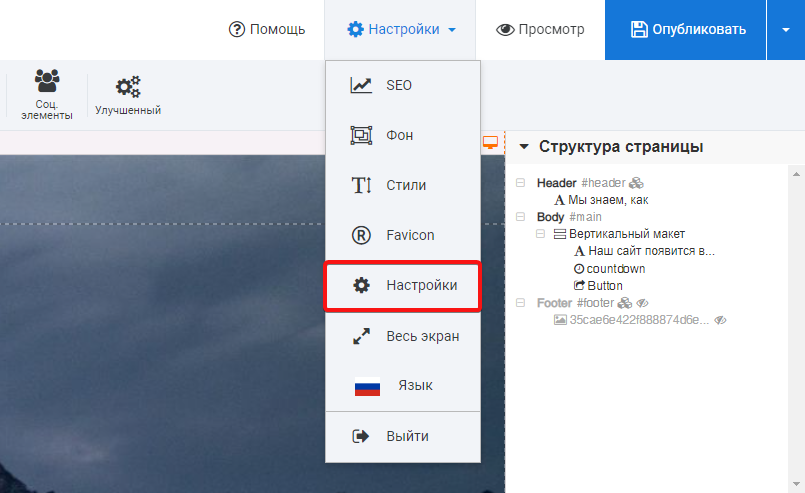
To access the Custom .htaccess section, hover over the Settings section, click Settings from the drop-down menu.
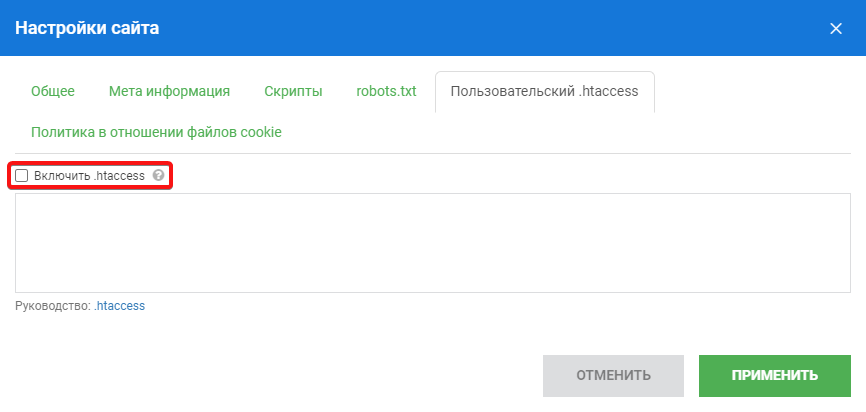
Open the Custom .htaccess menu, then enter the required directives in the input field. To enable these directives in the .htaccess file, check Enable .htaccess. Apply the settings, then publish the website. If you want to disable the directives without deleting them from the field: uncheck Enable .htaccess, apply the settings, then publish the website.
Examples of using .htaccess
1. Redirecting domain aliases to the main domain (301 code)
Redirect all requests to domain.ru from any domain alias:
RewriteEngine On

RewriteCond %{HTTP_HOST} !^domain\.ru$ [NC]

RewriteRule ^(.*)$ http://yourdomain.ru/$1 [L,R=301]
Redirect all requests to www.domain.ru from any domain alias:
RewriteEngine On

RewriteCond %{HTTP_HOST} !^www\.domain\.ru$ [NC]

RewriteRule ^(.*)$ http://www.yourdomain.ru/$1 [L,R=301]
It is recommended to place these rules at the very beginning of the .htaccess file.
2. Permanent redirect (301 code)
If you changed a page address, add the following lines to .htaccess so requests from the old URL redirect to the new one:
Redirect 301 /page.html http://www.yourdomain.ru/new_page.html
where:
- page.html — old page address relative to the site root
- www.domain.ru — site domain
- new_page.html — new page address
This rule does not work for redirects from addresses containing a Query String (characters after ?). For requests with a QUERY_STRING, use RewriteCond and RewriteRule.
Example: to redirect all requests to /period/?test=123 to domain.ru, you can write:
Options +FollowSymLinks

RewriteEngine On

RewriteCond %{QUERY_STRING} ^test=123$ [NC]

RewriteRule ^period/$ http://yourdomain.ru/ [L,R=301]
3. Overriding Error Pages
Using the .htaccess file, you can set your own error pages:
#401 Authorization required

ErrorDocument 401 http://domain.ru/errors/401.html

#403 — Page access forbidden

ErrorDocument 403 http://domain.ru/errors/403.html

#404 — The page you requested is missing

ErrorDocument 404 http://domain.ru/errors/404.html

#500 — Request error

ErrorDocument 500 http://domain.ru/errors/500.htm
The corresponding error page files (401.html, 404.html, etc.) should be placed in the ~/your_domain/docs/errors directory.
To prevent accidental direct links to such pages from being indexed by search engines, we recommend:
a) in the ~/your_domain/docs/robots.txt file, specify
User-agent: *

Disallow: /errors
b) create the ~/your_domain/docs/errors/.htaccess file, in which specify
Options -Indexes
4. Page-by-page redirect to another domain (301 code)
The following code will redirect all requests to pages of your site to similar pages of another site, for example, a request to http://domain.ru/main will be redirected to http://www.newdomain.ru/main:
Redirect 301 / http://www.newdomain.ru/
or:
RewriteEngine On

RewriteRule ^(.*)$ http://newdomain.ru/$1 [R=301,L]
5. Restricting site access by IP
Deny access from IPs 123.4.5.6 and 123.5.4.3:
Order Allow,Deny

Allow from all

Deny from 123.4.5.6 123.5.4.3
Allow access only from 123.4.5.6 and 123.5.4.3:
Order Deny,Allow

Deny from all

Allow from 123.4.5.6 123.5.4.3
Deny access for everyone:
Deny from all
6. Disabling Directory Listing
If the directory does not contain a homepage (index file), a request without specifying a specific file name will return a list of all files in the directory. To disable directory listing, add the following line to your .htaccess file:
Options -Indexes
7. Blocking referrals from external domains
To block access from baddomain.ru to domain.ru, add the following to .htaccess:
RewriteEngine on

RewriteCond %{HTTP_REFERER} baddomain\.ru [NC]

RewriteRule .* - [F]
To block multiple domains:
RewriteEngine on

RewriteCond %{HTTP_REFERER} baddomain\.ru [NC,OR]

RewriteCond %{HTTP_REFERER} baddomain2\.ru [NC,OR]

RewriteCond %{HTTP_REFERER} baddomain3\.ru [NC] RewriteRule .* - [F]
8. Using Cyrillic domains (.рф, .москва, etc.)
Cyrillic characters cannot be used in .htaccess. For redirects with Cyrillic domains, use the punycode representation. You can find the punycode of a domain using a Whois service.
Example: to redirect from site.ru to сайт.рф, use the following rule:
RewriteEngine on

RewriteCond %{HTTP_HOST} ^www\.site.ru [NC]

RewriteRule ^(.*)$ http://xn--80aswg.xn--p1ai/$1 [R=301,L]
In this case, visitors may see the punycode domain in the browser address bar. This is not an error.
Troubleshooting
If you receive a 500 error when accessing your site after editing or placing .htaccess, there is most likely an error in your .htaccess file. You can view the exact cause of the error in the log file: /var/log/your_domain.error_log
Additional documentation and examples
You can find detailed documentation on the official Apache web server website.